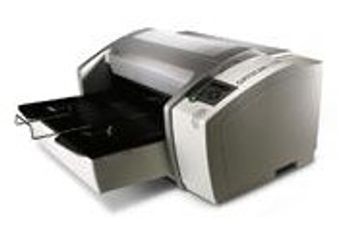
AGFA DRYSTAR 5300
 AGFA · Model DRYSTAR 5300
Reliable, low in maintenance, flexible, easy connectivity…these are just some of the key benefits of DRYSTAR 5300. Next-to-application imaging for decentralized applications The unit's small footprint means that convenient next-to-application installation is possible, even in the most space-restricted environments. Its freedom of placement makes it the perfect match for many modalities. With low investment and running costs, equipping every department with its own imaging solution becomes a reality. Excellent reliability, minimum maintenance DRYSTAR 5300 offers all the benefits of Direct Digital Imaging. This solid-state technology avoids the use of complex optical components, making the imager reliable and durable by design. Moreover, DRYSTAR 5300 is ecological and user-friendly. No more wet processing, no darkroom, no complicated adjustments or cleaning procedures. Environmentally harmful chemicals, water handling and disposal costs are things of the past. Easy connectivity for maximum flexibility DRYSTAR 5300 is a DICOM-native imager, which makes network connectivity easy. For point-to-point connection with non-DICOM modalities, DRYSTAR 5300 can be used with Agfa's LINX Paxport™.
Key tips
- ·Never bypass a radiation interlock to "just get the image" - this is one of the few true zero-tolerance rules in BMET work.
- ·Trend image-quality phantom results over time - drift shows up before an outright failure does.
- ·Portable/mobile units take real physical abuse from transport - check wheel locks and cable strain reliefs more often than fixed units.
Typical Failure Modes
Compiled for this model from its own documentation and established engineering knowledge for this equipment class - not from a verified service record. Confirm against the manufacturer's service manual.
Poor print quality
HighSymptoms: Density too light / dark, banding, streaks, non-uniform image, blotches.
Root cause: Print head / laser optics contamination, film / cartridge issue, or density-calibration drift.
Film jam / transport fault
MediumSymptoms: Film jams in the pick-up or transport, mis-feeds, or multi-feeds.
Root cause: Worn pick-up rollers, a transport-roller fault, or a mis-loaded film cartridge.
Density / calibration fault
MediumSymptoms: Prints do not match the reference, calibration fails, densitometer error.
Root cause: Internal densitometer or the calibration routine.
DICOM / queue fault
MediumSymptoms: Jobs stuck in the queue, printer offline to modalities, association failures.
Root cause: Network / DICOM configuration or the controller board.
Thermal head / laser fault
MediumSymptoms: Whole-image defect, print-engine error.
Root cause: Thermal print head or the laser / optics module.
Serviceable Parts & Consumables
Serviceable items for this model, compiled from its documentation and engineering knowledge for this equipment class. Service class and relative cost are estimates, not manufacturer figures; no part numbers are given. Confirm intervals and pricing against the manufacturer.
Pick-up / transport rollers
Class Periodic replacementRel. cost $$R&R Moderate
Thermal print head / laser optics
Class Periodic replacementRel. cost $$$R&R Difficult
Internal densitometer
Class Major service partRel. cost $$R&R Moderate
Controller / network board
Class Major service partRel. cost $$R&R Moderate
Film (media)
Class ConsumableRel. cost $$R&R Easy
| Part | Service class | Relative cost | R&R difficulty |
|---|---|---|---|
| Pick-up / transport rollers | Periodic replacement | $$ | Moderate |
| Thermal print head / laser optics | Periodic replacement | $$$ | Difficult |
| Internal densitometer | Major service part | $$ | Moderate |
| Controller / network board | Major service part | $$ | Moderate |
| Film (media) | Consumable | $$ | Easy |
Relative cost: $ lowest · $$$$ highest service-part cost for this equipment class. Not a price.
PM Checklist
Preventive-maintenance tasks typical of this equipment class. Perform to the manufacturer's procedure and your facility's policy - this is general reference, not a schedule for this specific unit.
- ·Daily QC per modality: image-quality phantom test
- ·Tube and detector inspection
- ·Annual state-required radiation safety survey
- ·Vendor-scheduled preventive maintenance
Troubleshooting Approach
A starting sequence for this model, compiled from its documentation and engineering knowledge for this equipment class. Follow the manufacturer's service documentation for the actual procedure.
Symptom: Poor print quality
- Print the built-in test / SMPTE pattern.
- Run the density calibration.
- Clean the print head / laser optics per the manual.
- Confirm the film type / cartridge matches the printer setting.
- Replace the print head or optics module if a whole-image defect persists.
Symptom: Film jam or jobs stuck
- Clear the jam and note the location.
- Inspect and clean the pick-up and transport rollers.
- For queue problems, check the DICOM association and network.
- Restart the print controller.
- Send a test job from a modality to confirm.
Technical Specs
- Height
- 13.8 in
- Throughput
- 80 films/hour 11” x 14”, 14” x 17” 60 sheets per hour
- Length
- 31.5 in
- Film Drawers
- 1
- Power Requirements
- 100-240 VAC
- Weight
- 121 lbs
- Time to First Film
- 90 sec
- Width
- 27.5 in
Typical Location
Where this class of equipment is typically deployed - general reference, not this unit's own placement record.
- Radiology / Imaging department
- Emergency Department (portable units)
- Operating Room (C-arms)
- Cath lab
- Bedside ICU (portable X-ray)
Documents & Manuals
Troubleshoot this device with Bio
Describe a symptom or error code. Bio answers from this device's own documented error codes, failure modes, parts, and guides.
Ask Bio