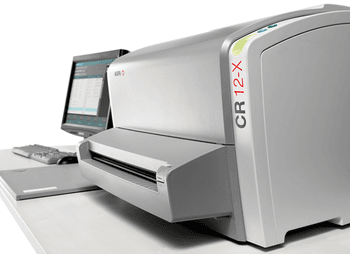
AGFA CR 12-X
 AGFA · Model CR 12-X
Why Choose CR 12-X? No compromise on image quality The CR 12-X’s use of MUSICA™ image processing delivers high image quality. MUSICA™ automatically analyzes the characteristics of each image and optimizes processing parameters – independent of body part and dose deviations. Artificial Intelligence for the right view, automatically With SmartRotate™ the cassette orientation is always right – which helps to provide more efficient, consistent and patient-centered care. Images are presented ready for viewing, directly and automatically. Versatile and cost-effective multiple study capabilities The CR 12-X’s broad range of application capabilities makes it highly versatile and cost-effective. With this single product capable of delivering multiple applications, investment is kept to a minimum while workflow is eased. Ideal for space restricted environments The CR 12-X’s table top footprint makes it ideal for space restricted areas. With additional fitments, it can be integrated easily as a mobile unit into cars, vans, trucks or other mobile facilities.
Key tips
- ·Never bypass a radiation interlock to "just get the image" - this is one of the few true zero-tolerance rules in BMET work.
- ·Trend image-quality phantom results over time - drift shows up before an outright failure does.
- ·Portable/mobile units take real physical abuse from transport - check wheel locks and cable strain reliefs more often than fixed units.
Typical Failure Modes
Compiled for this model from its own documentation and established engineering knowledge for this equipment class - not from a verified service record. Confirm against the manufacturer's service manual.
Poor image quality / artefacts
HighSymptoms: Banding, streaks, ghost images, non-uniform density, dust artefacts.
Root cause: Dirty light guide / scanning optics, a worn erase-lamp array, imaging-plate wear, or contaminated transport rollers.
Plate / cassette transport jam or mis-feed
MediumSymptoms: Plate jams in the reader, transport error, plate not returned.
Root cause: Worn or contaminated transport rollers / belts, or a sensor fault.
Incomplete erase / residual latent image
MediumSymptoms: A faint previous image appears on the next exposure.
Root cause: Erase-lamp array degradation or a driver fault.
Laser / PMT scanning fault
MediumSymptoms: No or very noisy image, scan-error message.
Root cause: Scanning laser or the photomultiplier / detection chain.
Workstation / DICOM fault
LowSymptoms: Images will not display, annotate or send to PACS.
Root cause: Workstation PC or the DICOM configuration.
Serviceable Parts & Consumables
Serviceable items for this model, compiled from its documentation and engineering knowledge for this equipment class. Service class and relative cost are estimates, not manufacturer figures; no part numbers are given. Confirm intervals and pricing against the manufacturer.
Transport rollers / belts
Class Periodic replacementRel. cost $$R&R Moderate
Erase-lamp array
Class Periodic replacementRel. cost $$$R&R Moderate
Imaging plates / cassettes
Class Periodic replacementRel. cost $$$R&R Easy
Light guide / scanning optics
Class Major service partRel. cost $$$R&R Difficult
Workstation PC
Class Major service partRel. cost $$$R&R Moderate
| Part | Service class | Relative cost | R&R difficulty |
|---|---|---|---|
| Transport rollers / belts | Periodic replacement | $$ | Moderate |
| Erase-lamp array | Periodic replacement | $$$ | Moderate |
| Imaging plates / cassettes | Periodic replacement | $$$ | Easy |
| Light guide / scanning optics | Major service part | $$$ | Difficult |
| Workstation PC | Major service part | $$$ | Moderate |
Relative cost: $ lowest · $$$$ highest service-part cost for this equipment class. Not a price.
PM Checklist
Preventive-maintenance tasks typical of this equipment class. Perform to the manufacturer's procedure and your facility's policy - this is general reference, not a schedule for this specific unit.
- ·Daily QC per modality: image-quality phantom test
- ·Tube and detector inspection
- ·Annual state-required radiation safety survey
- ·Vendor-scheduled preventive maintenance
Error Codes
Extracted directly from this unit's own service manual.
(4198)Message "Digitizer start-up" in Error Viewer
Troubleshooting Approach
A starting sequence for this model, compiled from its documentation and engineering knowledge for this equipment class. Follow the manufacturer's service documentation for the actual procedure.
Symptom: Poor image quality / artefacts (banding, streaks, ghosting, non-uniform density)
- Run the reader's cleaning and calibration / shading procedure.
- Clean the light guide, scanning optics and the transport rollers.
- Erase and re-image a plate to check for a residual latent image (worn erase lamps).
- Rotate in a fresh imaging plate / cassette to rule out plate wear.
- Escalate a scanning-laser / PMT / detector fault to the OEM.
Symptom: Plate / cassette jams or is not returned
- Clear the jammed plate per the manual and note where it hangs up.
- Inspect and clean or replace the transport rollers and belts.
- Check the transport / position sensors.
- Cycle several cassettes.
- Confirm reliable feed and return.
Symptom: Faint previous image on the next exposure (incomplete erase)
- Check the erase-lamp array for failed lamps / segments.
- Run an extended erase and re-image.
- Check the erase-lamp driver.
- Replace the erase-lamp array.
- Confirm a clean plate after a full erase.
Symptom: Images will not display, process or reach PACS
- Confirm the workstation is up and the DICOM store settings are correct.
- Send a test image and read the error.
- Check free disk space and the database.
- Restart the acquisition service.
- Escalate a workstation / network fault to IT.
Typical Location
Where this class of equipment is typically deployed - general reference, not this unit's own placement record.
- Radiology / Imaging department
- Emergency Department (portable units)
- Operating Room (C-arms)
- Cath lab
- Bedside ICU (portable X-ray)
Documents & Manuals
Troubleshoot this device with Bio
Describe a symptom or error code. Bio answers from this device's own documented error codes, failure modes, parts, and guides.
Ask Bio