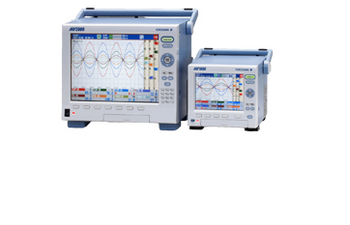
Advanced Instruments MV1000/MV2000
 Advanced Instruments · Model MV1000/MV2000
Multi-channel universal inputs MV1000: up to 24 input channels MV2000: up to 48 input channels Secure, high capacity memory Internal memory: 200 MB Choice of Compact Flash and USB removable storage media Removable input terminals simplify field wiring Lightweight aluminum construction (MV2000) Choice of secure binary or versatile text data file formats Advanced network connectivity with Email, file transfer, and web server functions. Battery model runs up to approximately 13 hours.
Key tips
- ·When no category-specific guidance fits, default to the manufacturer's own service manual and the general troubleshooting method in the Engineer's Guide.
- ·Run an incoming and annual electrical safety test regardless of how niche the device is.
Typical Failure Modes
Compiled for this model from its own documentation and established engineering knowledge for this equipment class - not from a verified service record. Confirm against the manufacturer's service manual.
A channel reads incorrectly or shows burnout
MediumSymptoms: One or more channels read wrong, over-range, or flag sensor burnout.
Root cause: Loose or wrong field wiring at the removable input terminal, or a failed thermocouple/RTD on that channel.
Removable storage media not recognised
MediumSymptoms: Compact Flash or USB media not read, data not saved.
Root cause: Faulty or incompatible media, or a worn media slot.
Short battery run time (battery model)
MediumSymptoms: Runs well under the rated ~13 hours, shuts down.
Root cause: Aged battery pack or charger fault.
Network functions fail
LowSymptoms: Email, FTP or the web server do not work.
Root cause: Network configuration change or a LAN interface fault.
Serviceable Parts & Consumables
Serviceable items for this model, compiled from its documentation and engineering knowledge for this equipment class. Service class and relative cost are estimates, not manufacturer figures; no part numbers are given. Confirm intervals and pricing against the manufacturer.
Removable input terminal block
Class Major service partRel. cost $$R&R Fairly easy
Compact Flash / USB media
Class Periodic replacementRel. cost $R&R Easy
Battery pack (battery model)
Class Periodic replacementRel. cost $$R&R Fairly easy
Display assembly
Class Major service partRel. cost $$$R&R Moderate
| Part | Service class | Relative cost | R&R difficulty |
|---|---|---|---|
| Removable input terminal block | Major service part | $$ | Fairly easy |
| Compact Flash / USB media | Periodic replacement | $ | Easy |
| Battery pack (battery model) | Periodic replacement | $$ | Fairly easy |
| Display assembly | Major service part | $$$ | Moderate |
Relative cost: $ lowest · $$$$ highest service-part cost for this equipment class. Not a price.
PM Checklist
Preventive-maintenance tasks typical of this equipment class. Perform to the manufacturer's procedure and your facility's policy - this is general reference, not a schedule for this specific unit.
- ·Follow the manufacturer's PM schedule
- ·Perform incoming and annual electrical safety testing per facility biomedical program
Troubleshooting Approach
A starting sequence for this model, compiled from its documentation and engineering knowledge for this equipment class. Follow the manufacturer's service documentation for the actual procedure.
Symptom: A channel reads wrong
- Look up the error/status message in the manual's troubleshooting section.
- Reseat the field wiring at the removable input terminal and confirm polarity and sensor type in the channel setup.
- Substitute a known-good sensor on that channel.
- Move the sensor to a spare channel to isolate wiring vs input circuit.
- Run the calibration check for that input range.
Symptom: Media not recognised
- Try a different, compatible CF card or USB drive.
- Reformat the media in the recorder.
- Inspect the slot for debris or bent contacts.
- Save to the alternate media type to confirm the recorder side.
- Replace the media or refer the slot for service.
Typical Location
Where this class of equipment is typically deployed - general reference, not this unit's own placement record.
- Varies by device - check the unit's own manual for facility placement guidance
Documents & Manuals
Troubleshoot this device with Bio
Describe a symptom or error code. Bio answers from this device's own documented error codes, failure modes, parts, and guides.
Ask Bio