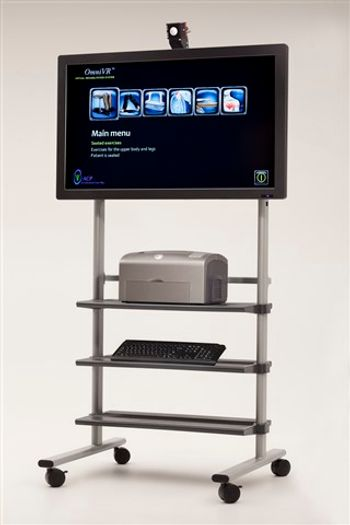
ACP OmniVR
 ACP · Model OmniVR
Easy-to-use, "one touch" operation. Special 3D camera recreates the patient's movements in a "real time" interactive experience, to enhance patient participation and improve motivation and outcomes. 6 Different "Skilled" Exercise Modes developed for lower-functioning patients: Seated. Exercise, Wheelchair Propulsion and Control, Upper Extremity, Balance, Walking, and Cardio. Geriatric-friendly system does not require hand controllers, special mats or platforms to stand on. Ideal for both One-on-One and Group Therapy applications, with the capability to accommodate multiple patients simultaneously.
Key tips
- ·When no category-specific guidance fits, default to the manufacturer's own service manual and the general troubleshooting method in the Engineer's Guide.
- ·Run an incoming and annual electrical safety test regardless of how niche the device is.
Typical Failure Modes
Compiled for this model from its own documentation and established engineering knowledge for this equipment class - not from a verified service record. Confirm against the manufacturer's service manual.
3D camera not tracking the patient
HighSymptoms: Avatar does not follow the patient, exercises will not register movement, calibration fails.
Root cause: Camera obstructed, poor room lighting, patient outside the capture zone, or a camera / USB fault.
Application will not start or freezes
MediumSymptoms: Software hangs, one-touch start does nothing, error on launch.
Root cause: PC / operating-system fault or a corrupt software state.
No or distorted display output
MediumSymptoms: Blank screen or distorted image on the patient display.
Root cause: Display, video cable, or graphics output fault.
Cabling / connection fault
LowSymptoms: Camera or display intermittently drops out.
Root cause: Worn USB or video cable at the cart.
Serviceable Parts & Consumables
Serviceable items for this model, compiled from its documentation and engineering knowledge for this equipment class. Service class and relative cost are estimates, not manufacturer figures; no part numbers are given. Confirm intervals and pricing against the manufacturer.
3D motion camera
Class Major service partRel. cost $$$R&R Fairly easy
Cart PC
Class Major service partRel. cost $$$R&R Moderate
Patient display
Class Major service partRel. cost $$R&R Fairly easy
USB / video cabling
Class Periodic replacementRel. cost $R&R Easy
| Part | Service class | Relative cost | R&R difficulty |
|---|---|---|---|
| 3D motion camera | Major service part | $$$ | Fairly easy |
| Cart PC | Major service part | $$$ | Moderate |
| Patient display | Major service part | $$ | Fairly easy |
| USB / video cabling | Periodic replacement | $ | Easy |
Relative cost: $ lowest · $$$$ highest service-part cost for this equipment class. Not a price.
PM Checklist
Preventive-maintenance tasks typical of this equipment class. Perform to the manufacturer's procedure and your facility's policy - this is general reference, not a schedule for this specific unit.
- ·Follow the manufacturer's PM schedule
- ·Perform incoming and annual electrical safety testing per facility biomedical program
Troubleshooting Approach
A starting sequence for this model, compiled from its documentation and engineering knowledge for this equipment class. Follow the manufacturer's service documentation for the actual procedure.
Symptom: Camera will not track
- Clear the space in front of the camera and confirm even room lighting without strong backlight.
- Have the patient stand within the marked capture zone.
- Re-run the camera calibration in the software.
- Reseat the camera USB cable and try another port.
- Replace the camera if calibration still fails.
Symptom: Software will not start
- Restart the PC.
- Confirm the display and camera are connected before launch.
- Reinstall or repair the OmniVR software if it will not load.
- Check available disk space and Windows updates.
- Contact ACP support if it still fails.
Typical Location
Where this class of equipment is typically deployed - general reference, not this unit's own placement record.
- Varies by device - check the unit's own manual for facility placement guidance
Documents & Manuals
Troubleshoot this device with Bio
Describe a symptom or error code. Bio answers from this device's own documented error codes, failure modes, parts, and guides.
Ask Bio