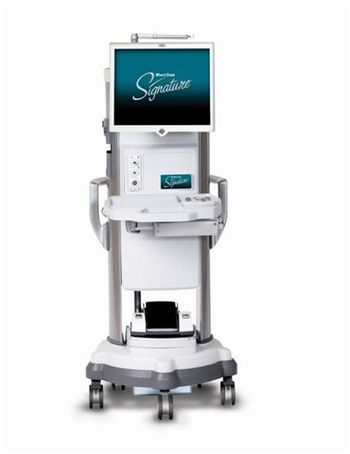
Abbott Medical Optics WHITESTAR Signature
 Abbott Medical Optics · Model WHITESTAR Signature
FUSION Fluidics FUSION Fluidics provides increased chamber stability. It anticipates intraocular changes and proactively adjusts, so chamber stability can be maintained - even at higher vacuum and flow settings. Based on pre-set specifications, FUSION® Fluidics adapts to changes in vacuum immediately and automatically. FUSION Fluidics surge-prevention technology allows the use of high vacuum and flow settings to reduce phaco time and increase efficiency. Improves chamber stability by anticipating occlusions and preemptively adjusting vacuum before occlusion breaks. Provides precise, low-flow parameters for complicated cases. One-step, auto-loading FUSION® Fluidics cassette decreases turnover time Wireless Advanced Control Pedal The Wireless Advanced Control Pedal offers you the freedom to achieve the perfect balance of control, confidence and performance! Full wireless range of approximately 3 meters (10 feet) via secure Bluetooth®** connection. Eliminates clutter and the need for cables in the operating room. Offers traditional and dual-linear functionality. Non-zero start capabilities to increase efficiency. Quick and easy touchscreen set-up Easy-to-use, advanced technology With the WHITESTAR Signature® system's ergonomic accessories and streamlined interface, the efficiency of the surgical environment is improved. It offers a number of new time-saving features including fast prime/tune, one-step easy-load tubing pack, intuitive user interface, and a sophisticated on-screen help program. It also incorporates today's high technology into cutting-edge features and accessories. One-touch prime/tune cycle is AMO's fastest ever to expedite OR turnover. Surgeon settings can be uploaded to any WHITESTAR Signature® System from a memory stick. Wireless Bluetooth accessories and multi-lingual voice confirmation for hands-free communication and control. 17" LCD panel touch screen features one-touch access to all settings. Easy-to-use wireless remote gives OR staff more flexibility Revolutionary surgical archive and teaching tool Designed for use with AMO's latest phaco systems, the Surgical Media Center revolutionizes surgical data management and phaco education with a new and innovative approach to traditional video overlay. This flexible surgical archive and teaching tool offers a real-time blending of system data and surgical video, as well as comprehensive playback and editing capability. No other overlay system can match its level of sophistication, adaptability, and ease. Offers a unique presentation / surgical archive and teaching tool. Unique recall capability allows you to go back and view data and events even if they were not displayed during surgery. Manipulate data previews in a variety of ways (e.g. enlarge a graph or move the data to a different area of the screen so it doesn't block the surgical footage). Make advanced video presentations and play back recordings using enhanced features including frame-by-frame analysis Provides customizable video overlays. Choose data parameters such as aspiration, vacuum, power, bottle height, and occlusion settings from 20 different selections and combinations. Configure the screen as data plots, animated images, plain text, or static images. Proprietary Fusion Fluidics anticipates occlusions and preemptively adjusts the vacuum for improved chamber stability. Distinctive Dual Pump Technology offers both venturi and peristaltic modalities in a convenient single cassette. Exceptional Ellips Transversal Ultrasound provides a new alternative to torsional phaco.
Key tips
- ·Verify laser output with a real power meter, not the unit's own display - the display can drift independently of true output.
- ·Take "the image looks a little off" reports seriously - optical alignment drift is usually gradual, not sudden.
Typical Failure Modes
Compiled for this model from its own documentation and established engineering knowledge for this equipment class - not from a verified service record. Confirm against the manufacturer's service manual.
Poor phaco / vacuum performance
HighSymptoms: Weak ultrasonic power, poor followability, vacuum will not build or holds poorly, surge.
Root cause: Worn phaco handpiece / tip, a cracked or worn tubing / cassette, or a pump / vacuum-sensor fault.
Handpiece fault (phaco / I-A / vit)
MediumSymptoms: Handpiece will not tune, overheats, no irrigation / aspiration, cutter not cutting (vit).
Root cause: Worn or damaged handpiece, or its connector / cable.
Fluidics / cassette-detection fault
MediumSymptoms: Cassette not recognised, priming / tuning fails, fluid leaks at the cassette.
Root cause: Cassette-detection switch, the peristaltic / Venturi pump, or fluidics seals.
Footpedal fault
MediumSymptoms: Pedal positions not registering, wireless pedal not pairing.
Root cause: Worn footpedal or its cable / wireless module.
Pneumatics fault (vitrectomy cutter)
LowSymptoms: Cut rate low or erratic, cutter will not drive.
Root cause: Internal pneumatic valve or a supply-pressure fault.
Serviceable Parts & Consumables
Serviceable items for this model, compiled from its documentation and engineering knowledge for this equipment class. Service class and relative cost are estimates, not manufacturer figures; no part numbers are given. Confirm intervals and pricing against the manufacturer.
Phaco / I-A / vitrectomy handpiece
Class Periodic replacementRel. cost $$$R&R Fairly easy
Peristaltic / Venturi pump components
Class Periodic replacementRel. cost $$$R&R Difficult
Cassette-detection switch / fluidics seals
Class Periodic replacementRel. cost $$R&R Moderate
Footpedal / wireless module
Class Periodic replacementRel. cost $$R&R Fairly easy
Pneumatic valve (vitrectomy)
Class Major service partRel. cost $$R&R Moderate
| Part | Service class | Relative cost | R&R difficulty |
|---|---|---|---|
| Phaco / I-A / vitrectomy handpiece | Periodic replacement | $$$ | Fairly easy |
| Peristaltic / Venturi pump components | Periodic replacement | $$$ | Difficult |
| Cassette-detection switch / fluidics seals | Periodic replacement | $$ | Moderate |
| Footpedal / wireless module | Periodic replacement | $$ | Fairly easy |
| Pneumatic valve (vitrectomy) | Major service part | $$ | Moderate |
Relative cost: $ lowest · $$$$ highest service-part cost for this equipment class. Not a price.
PM Checklist
Preventive-maintenance tasks typical of this equipment class. Perform to the manufacturer's procedure and your facility's policy - this is general reference, not a schedule for this specific unit.
- ·Optical alignment / calibration check
- ·Lamp or laser output verification
- ·Annual full PM
Error Codes
Extracted directly from this unit's own service manual.
1414 Parameter Check Failure. Select Next Case. A value was found outside the parameter check range Hardware failure or program error System is placed to a safe state
1. Select Next Case and retry. 2. Recycle Power 3. Check error log for other related error codes 4. Resolve other related errors 5. Replace Hard Disk Drive
101101 Fluidics communication error. Select Next Case. Invalid data from the Instrument Host A parameter written to the Fluidic Microcontroller by the Host is out of range Communication errors
1. Select Next Case and retry. 2. Recycle Power 3. Instrument Host SBC PCB 4. Subsystem Controller PCB
102102 Fluidics write error. Cycle Power. Microcontroller SPI SPI Bus EEPROM or ADC is faulty Unable to save EEPROM variables or configure strain gauge ADC
1. Recycle Power 2. Subsystem Controller PCB
103103 Fluidics read error. Cycle Power. Microcontroller SPI SPI Bus EEPROM or ADC is faulty Unable to read EEPROM or ADC. Fluidics will not operate properly
1. Recycle Power 2. Subsystem Controller PCB
104104 Fluidics Reservoir Vacuum Level Error. Re-Prime. During leak test, the initial reservoir vacuum level does not reach the required minimum System vacuum pump will not run at 600 mmHg Shop air pressure low Venturi muffler clogged Shop air valve clogged Shop air leak Venturi vacuum path leak Vacuum sensor not calibrated or faulty
1. Re-Prime 2. Disconnect Shop Air. If error clears, replace Pneumatic Control Assembly
Troubleshooting Approach
A starting sequence for this model, compiled from its documentation and engineering knowledge for this equipment class. Follow the manufacturer's service documentation for the actual procedure.
Symptom: Poor phaco / vacuum performance / weak power
- Fit a fresh tip and test-tune the handpiece in a beaker of BSS.
- Fit a new cassette / tubing and re-prime.
- Run the fluidics / vacuum self-test and check for leaks at the cassette.
- Verify vacuum and rise time against the service spec.
- Send the handpiece for service or exchange if it will not tune.
Symptom: Cassette / tubing not recognised / priming fails / fluid leak
- Reseat the cassette and confirm it clicks home.
- Check the cassette-detection switch.
- Inspect the peristaltic / Venturi pump and the fluidics seals.
- Re-run prime and tune.
- Replace the detection switch or the pump components as isolated.
Symptom: Footpedal fault (positions not registering, wireless not pairing)
- Check the footpedal cable / connector or re-pair the wireless pedal.
- Test each pedal position and treadle range.
- Replace the footpedal.
- Confirm the console responds to every position.
- Update the console firmware if a pedal issue is a known fault.
Typical Location
Where this class of equipment is typically deployed - general reference, not this unit's own placement record.
- Eye clinic / ophthalmology suite
- Operating Room (ophthalmic surgery)
Documents & Manuals
Troubleshoot this device with Bio
Describe a symptom or error code. Bio answers from this device's own documented error codes, failure modes, parts, and guides.
Ask Bio