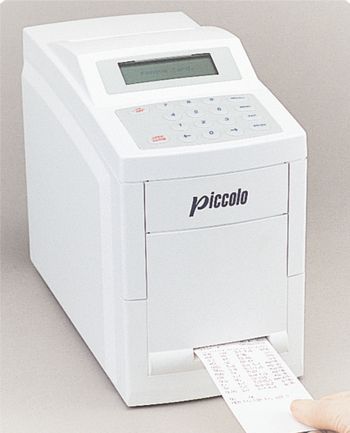
Abaxis Piccolo
 Abaxis · Model Piccolo
Abaxis' Piccolo Chemistry Analyzer.
Typical Failure Modes
Compiled for this model from its own documentation and established engineering knowledge for this equipment class - not from a verified service record. Confirm against the manufacturer's service manual.
Ambient or analyzer temperature out of range (Code 11 / 12)
MediumSymptoms: "Code 11" or "Code 12", run cancelled, drawer opens.
Root cause: Room temperature outside 15-32 C, or the analyzer too hot after many runs or too cold at start-up.
Disc barcode / read error (Code 10)
MediumSymptoms: "Code 10", run cancelled, repeat with a new disc.
Root cause: Scratched or spilled disc barcode, or outdated analyzer software.
Internal optical / rotor fault
HighSymptoms: Repeated run failures with internal error codes, poor precision across chemistries.
Root cause: Optics contamination or a drive/rotor fault - record the internal error code for Abaxis Technical Support.
Printer paper jam / faint print
LowSymptoms: No results card printout, jams, faint text.
Root cause: Dirty printer or results-card slot (clean every 3 months).
Serviceable Parts & Consumables
Serviceable items for this model, compiled from its documentation and engineering knowledge for this equipment class. Service class and relative cost are estimates, not manufacturer figures; no part numbers are given. Confirm intervals and pricing against the manufacturer.
Reagent disc
Single-use; observe the expiry printed in the barcode.
Class ConsumableRel. cost $R&R Easy
Air filter
Class Frequent wear itemRel. cost $R&R Easy
Thermal printer / paper
Class Periodic replacementRel. cost $R&R Fairly easy
Optical / rotor assembly (Abaxis service)
Class Major service partRel. cost $$$R&R Difficult
| Part | Service class | Relative cost | R&R difficulty |
|---|---|---|---|
| Reagent disc Single-use; observe the expiry printed in the barcode. | Consumable | $ | Easy |
| Air filter | Frequent wear item | $ | Easy |
| Thermal printer / paper | Periodic replacement | $ | Fairly easy |
| Optical / rotor assembly (Abaxis service) | Major service part | $$$ | Difficult |
Relative cost: $ lowest · $$$$ highest service-part cost for this equipment class. Not a price.
Error Codes
Extracted directly from this unit's own service manual.
Code 10Run canceled: Barcode error. Repeat run with new disc.
xxxx See Code 10. The disc bar code is unreadable because of scratches, spills, or other problems; or an outdated version of the software is installed on the analyzer. Record the internal error code (xxxx). Press EXIT to acknowledge the message and open the drawer. Remove and discard the disc. Prepare a new disc using the sample or control and proceed with testing. If this error message appears again during testing of the second disc, record the second internal error code. Insert a result card to print a troubleshooting report. When printing is complete, press EXIT . Remove and discard the disc. Call Abaxis Technical Support with both internal error codes and the troubleshooting report at hand.
Code 11Ambient temperature outside operational range of analyzer.
See Code 11. The ambient temperature is outside the analyzer operating range (15-32°C; 59-90°F). Press EXIT to acknowledge the message. Adjust the room temperature, or power down the analyzer and move it to a warmer or cooler environment.
Code 12Run canceled. Analyzer temperature outside operating range.
See Code 12. The analyzer temperature is too high or too low to run the disc. Press EXIT to acknowledge the message and open the drawer. Remove and discard the disc. Temperature too low: If you are running the first disc after powering up, allow the analyzer more warm-up time. If the ambient temperature is below 15°C (59°F), adjust the room temperature or move the analyzer to a warmer environment. Use a new disc to run the sample or control. Temperature too high: If the analyzer has run several discs, open the drawer and allow it to cool down for about 15 minutes. Use a new disc to run the sample or control.
Code 13Run canceled. Disc out of date. Repeat run with new disc.
See Code 13. The disc expiration date has passed. Press EXIT to acknowledge the message and open the drawer. Remove and discard the disc. Verify that the analyzer is using the correct date. Refer to 3.2. Use a within-date disc to run the sample or control.
Code 14Run canceled. Repeat run with new disc.
xxxx See Code 14. The problem may be with the sample, the disc, or the analyzer hardware or software. Record the internal error code (xxxx). Press EXIT to acknowledge the message and open the drawer. Remove and discard the disc. Use a new disc to run the sample or control. There may be a brief delay (10-15 seconds) before testing begins. If this error message appears again during testing of the second disc, record the second internal error code. Insert a result card to print a troubleshooting report. Press EXIT to acknowledge the message and open the drawer. Remove and discard the disc. Call Abaxis Technical Support with both internal error codes and the troubleshooting report at hand.
Code 15Run canceled. Insufficient sample. Repeat run with new disc.
See Code 15. The run has been canceled due to one of the following: • Insufficient sample or control is in the disc. • The whole blood sample has clotted. • A used disc has been left in the analyzer. Press EXIT to acknowledge the message and open the drawer. Check the disc for insufficient or coagulated sample. Discard the disc. Use a new disc to run the sample or control.
Code 21Analyzer overheated.
See Code 21. This message may be displayed at the end of a run. The results of that run are not affected and may be reported. However, unless the analyzer is allowed to cool down, the next run may be aborted. Press EXIT to acknowledge the message and open the drawer. Remove and discard the disc. Leave the drawer open and allow the analyzer to cool down for about 15 minutes. If necessary, adjust the room temperature to 32°C (90°F) or less, or move the analyzer to a cooler environment.
Code 22Faulty software card.
xxxx See Code 22. This message may be displayed after powering up the analyzer. The software card may not be seated properly or may be faulty. Record the internal error code (xxxx). Press EXIT to acknowledge the message. The analyzer automatically shuts down. Refer to 5.3 for the procedure to reinstall the software card. If the problem persists, call Abaxis Technical Support.
Code 24Paper jammed in printer. Refer to manual to clear.
See Code 24. Refer to 5.2 for instructions on clearing a paper jam.
Code 25Drawer malfunction.
See Code 25. The drawer motor has shut down because the drawer cannot completely close or open. Drawer does not close: Press EXIT to acknowledge the message. Inspect the disc to see if the bar code ring has separated from the disc. If no separation is visible, reposition the disc and press close. If separation is visible, prepare a new disc and load it. Drawer does not open: Call Abaxis Technical Support.
Code 26Analyzer failure. Remove from service.
xxxx See Code 26. The analyzer has been exposed to very cold temperatures or there is a problem with the analyzer hardware that cannot be corrected by resetting the analyzer (powering down and up). Record the internal error code (xxxx). Press EXIT to acknowledge the message. Power down the analyzer and allow it to sit for 15-30 minutes at an ambient temperature of 15-32°C (59-90°F). Power up the analyzer and allow adequate warm-up time before running a disc. If the analyzer has not been exposed to cold temperatures, there may be a hardware problem. Record the internal error code (xxxx). Press EXIT to acknowledge the message and shut down the analyzer. Call Abaxis Technical Support.
Code 27Run canceled. Disc rubbing. Repeat run with new disc.
xxxx See Code 27. The disc is not spinning properly or is rubbing against the walls of the drawer. Record the internal error code (xxxx). Press EXIT to acknowledge the message and open the drawer. Remove and discard the disc. Use a new disc to run the sample or control. If this error appears again during testing of the second disc, record the second internal error code. Call Abaxis Technical Support with both internal error codes at hand.
Troubleshooting Approach
A starting sequence for this model, compiled from its documentation and engineering knowledge for this equipment class. Follow the manufacturer's service documentation for the actual procedure.
Symptom: Code 11 or Code 12 temperature error
- Press EXIT and remove the disc.
- Check the room is 15-32 C and adjust or relocate the analyzer.
- For a too-low first run after power-up, allow more warm-up time.
- For too-high after several runs, open the drawer and let it cool ~15 minutes.
- Run the sample or control on a new disc.
Symptom: Repeated run failures
- Record the internal error code shown on line 4 before pressing EXIT.
- Print the troubleshooting report if one is generated.
- Clean the exterior, printer and results-card slot, and the air filter.
- Retry with a fresh disc and a control.
- Call Abaxis Technical Support with the error codes and report.
Documents & Manuals
Related calculators
From BioLab, for work done with this kind of equipment.
Troubleshoot this device with Bio
Describe a symptom or error code. Bio answers from this device's own documented error codes, failure modes, parts, and guides.
Ask Bio