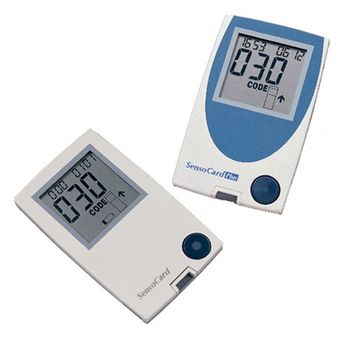
77 Elektronika SensoCard Plus
 77 Elektronika · Model SensoCard Plus
Advanced biosensor technology. Average test time: 5 sec. Min. sample volume: 0.5 µl. Virtually pain-free. Optional whole blood calibration or plasma equivalent calibration upon request. Memory capacity: last 500 test data. Long life, lithium battery. Data downloading capability to PC.
Typical Failure Modes
Compiled for this model from its own documentation and established engineering knowledge for this equipment class - not from a verified service record. Confirm against the manufacturer's service manual.
Result / QC failure
HighSymptoms: Result flagged or biased, QC control out of range, strip / cartridge error code.
Root cause: Expired or mishandled strips / cartridges, a temperature / hematocrit interference, or an optics / electrode fault.
Strip / cartridge port fault
MediumSymptoms: Strip not detected, error on insertion, intermittent contact.
Root cause: Contaminated or worn strip-port contacts / optics.
Will not power on / battery fault
MediumSymptoms: Dead unit, short battery life, will not charge.
Root cause: Depleted or aged battery.
Barcode / connectivity fault
LowSymptoms: Operator / lot barcode will not scan, results not sent to the docking / LIS.
Root cause: Barcode reader or the docking-station / wireless link.
Display / button fault
LowSymptoms: Missing segments, unresponsive buttons.
Root cause: Display or keypad fault.
Serviceable Parts & Consumables
Serviceable items for this model, compiled from its documentation and engineering knowledge for this equipment class. Service class and relative cost are estimates, not manufacturer figures; no part numbers are given. Confirm intervals and pricing against the manufacturer.
Test strips / cartridges
Class Frequent wear itemRel. cost $$R&R Easy
QC control solutions
Class Frequent wear itemRel. cost $R&R Easy
Battery
Class Frequent wear itemRel. cost $R&R Easy
Strip-port contacts / optics module
Class Periodic replacementRel. cost $$R&R Moderate
Docking station / barcode reader
Class Periodic replacementRel. cost $$R&R Fairly easy
| Part | Service class | Relative cost | R&R difficulty |
|---|---|---|---|
| Test strips / cartridges | Frequent wear item | $$ | Easy |
| QC control solutions | Frequent wear item | $ | Easy |
| Battery | Frequent wear item | $ | Easy |
| Strip-port contacts / optics module | Periodic replacement | $$ | Moderate |
| Docking station / barcode reader | Periodic replacement | $$ | Fairly easy |
Relative cost: $ lowest · $$$$ highest service-part cost for this equipment class. Not a price.
Error Codes
Extracted directly from this unit's own service manual.
E-0 If this error message remains on screen after turning meter on, the meter has got damaged. Please remove the batteries and keep the OK button pressed about 15-20 seconds the batteries and turn on the meter. If E-0 appears again, please contact your local distributor.
E-2 Strip has been removed from the instrument during measurement.
E-3 Used strip is inserted. Repeat measurement with new test strip! Check-strip is inserted instead of test strip. Replace it with a test strip.
E-5 Strong electromagnetic field (e.g.: mobile phone) or high intensity electrostatic discharge interfere with the meter. Repeat the measurement.
E-6 Batteries are low. Replace the batteries. High intensity electrostatic discharge may influence the meter. Please remove the batteries and keep the OK button pressed about 15-20 seconds.
E-7 Insufficient amount of blood was applied on strip. Repeat test with bigger drop of blood. High intensity electrostatic discharge may influence the meter. Please repeat the measurement.
E-8 Test wasn't performed properly. Repeat test with new test strip and be more careful when performing each step.
E-9 External temperature is too high or low (out of the range 10-40 °C). Wait at least 30 minutes before using the device, until it completely reaches room temperature. SensoCard is able to check external temperature. If it detects values not conforming to its operational requirements, the following error messages will be displayed: An arrow icon directed downward and the E-9 error message together indicate low temperature (below 10 °C).
E-CThis error message may appear during using Code-card. There might be one of the following problems: Code-card is damaged. Please check the integrity of Code-card. If you can find any mechanical damage on Code-card, contact your local distributor.
E-OIf this error message remains on screen after turning meter on, the meter has got damaged.
Please remove the batteries and keep the OK button pressed about 15-20 seconds the batteries and turn on the meter. If E-0 appears again, please contact your local distributor.
Troubleshooting Approach
A starting sequence for this model, compiled from its documentation and engineering knowledge for this equipment class. Follow the manufacturer's service documentation for the actual procedure.
Symptom: Sensor / electrode fault or drift / QC failure
- Run the relevant calibration and check the sensor / electrode status screen.
- De-bubble / rinse the measuring path and check for protein deposits.
- Replace an electrode / membrane / sensor cassette at end of life or that fails calibration.
- Confirm the solution pack / reagent cartridge and calibration gas are in date and not empty.
- Re-run QC at the relevant levels before releasing results.
Symptom: Sample not aspirated / clot / inlet alarm
- Run the inlet / preheater clot-removal or rinse routine.
- Inspect the inlet probe and gasket.
- Replace the inlet gasket or probe.
- Confirm free sample aspiration with a QC sample.
- Replace worn peristaltic pump tubing if transport is still poor.
Symptom: Result flagged / questionable vs the clinical picture
- Repeat with a fresh sample / strip / cassette from correctly stored, in-date stock.
- Run the QC controls at each level.
- Confirm the meter / analyzer is coded / calibrated to the current lot.
- Clean the measurement chamber / strip port and the optics per the manual.
- Quarantine the lot if QC fails; refer the analyzer if QC passes but a result still looks wrong.
Symptom: Will not power on / short battery life / strip-port fault (handhelds)
- Fit fresh batteries or confirm the charger / dock.
- Clean the strip-port contacts / optics.
- Try several strips from a fresh vial.
- Replace the battery.
- Replace the meter if it will not read known-good strips.
Technical Specs
- Height
- 90 mm
- Length
- 15 mm
- Weight
- 96 g
- Width
- 55 mm
Documents & Manuals
Troubleshoot this device with Bio
Describe a symptom or error code. Bio answers from this device's own documented error codes, failure modes, parts, and guides.
Ask Bio