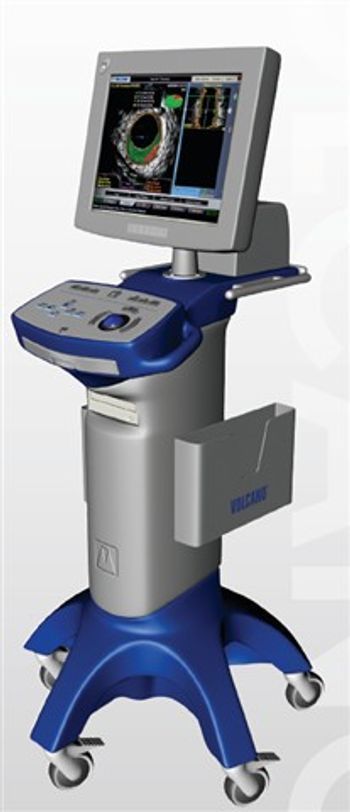
Volcano s5i IVUS
 Volcano · Model s5i IVUS
Always Ready, Always Available Instant-On IVUS Capability: Eliminates delays in procedure setup Integrated Lab Workflow: Supports continuous availability across procedures Increased IVUS Utilization: Enables more patients to benefit from advanced imaging Flexible, Modular System Design Component-Based Architecture: Adapts to various lab configurations Scalable Setup: Customize based on clinical and operational needs No Console Transport Required: Reduces downtime and improves efficiency Advanced PC-Based Platform Remote Operation Capability: Control the system from multiple locations Multiple Input Devices: Compatible with different control interfaces Custom Viewing Options: Tailor display settings for optimal visualization Optimized Interventional Workflow Seamless Integration: Designed for catheterization labs and hybrid ORs Enhanced Imaging Access: Supports real-time intravascular assessment Improved Clinical Decision Support: Assists with lesion evaluation and treatment planning (Generated by AI)
Typical Failure Modes
Compiled for this model from its own documentation and established engineering knowledge for this equipment class - not from a verified service record. Confirm against the manufacturer's service manual.
Will not power on or unexpected shutdown
HighSymptoms: The medical imaging is dead, reboots, or shuts down mid-use.
Root cause: Mains lead / fuse, an aged battery, or a power-supply board fault.
Battery will not hold charge
MediumSymptoms: Short run time on battery; low-battery alarm soon after a full charge.
Root cause: Aged rechargeable battery pack or a charger fault.
Display / control-panel fault
MediumSymptoms: Blank, dim or distorted display; unresponsive keys or touchscreen.
Root cause: Display, backlight, or control-board fault.
Fails self-test or calibration
MediumSymptoms: Power-on self-test or the scheduled performance check fails or is out of tolerance.
Root cause: Sensor drift or an internal board fault; recalibration or repair needed.
Serviceable Parts & Consumables
Serviceable items for this model, compiled from its documentation and engineering knowledge for this equipment class. Service class and relative cost are estimates, not manufacturer figures; no part numbers are given. Confirm intervals and pricing against the manufacturer.
Rechargeable battery pack
Class Periodic replacementRel. cost $$R&R Fairly easy
Power supply / mains board
Class Major service partRel. cost $$$R&R Difficult
Display / control-panel assembly
Class Major service partRel. cost $$$R&R Moderate
Cooling fan
Class Major service partRel. cost $R&R Moderate
| Part | Service class | Relative cost | R&R difficulty |
|---|---|---|---|
| Rechargeable battery pack | Periodic replacement | $$ | Fairly easy |
| Power supply / mains board | Major service part | $$$ | Difficult |
| Display / control-panel assembly | Major service part | $$$ | Moderate |
| Cooling fan | Major service part | $ | Moderate |
Relative cost: $ lowest · $$$$ highest service-part cost for this equipment class. Not a price.
Error Codes
Extracted directly from this unit's own service manual.
1 beepRefresh Circuits have been reset. (Ready to power up.)
5 short, 1 longMemory error No memory detected in system
8 beepsDisplay memory read/write error Video adapter missing or with faulty memory
Troubleshooting Approach
A starting sequence for this model, compiled from its documentation and engineering knowledge for this equipment class. Follow the manufacturer's service documentation for the actual procedure.
Symptom: Image artefacts / poor fluoro or CT image / failed calibration
- Run the daily air / water (fast) calibration; if it fails, run the full calibration set.
- Scan / image a uniform phantom and review uniformity and noise against baseline.
- Check the X-ray tube warm-up and heat-unit / arc status.
- Check the detector / image-intensifier / flat-panel performance via service diagnostics.
- Escalate a confirmed detector-channel, DAS or tube fault to the OEM; re-verify with the phantom after any correction.
Symptom: Exposure aborts / tube-arc errors / kV-mAs fault
- Record the exact error codes and the phase (warm-up vs scan / fluoro vs cine).
- Run extended tube conditioning / seasoning.
- Review the arc-count and heat-unit trend.
- Confirm the chiller / heat-exchanger operates and coolant is at level.
- Plan a tube replacement when arc counts climb or output drifts; verify output after any HV work.
Symptom: Gantry rotation / slip-ring / positioner fault
- Note the axis and any collision-sensor indication.
- Clear obstructions and check the body-contour / collision sensors.
- Inspect the slip-ring brushes (dust, wear) and the drive belt / bearings.
- Run the motion self-test / calibration.
- Replace the brush set / drive component or refer as isolated.
Symptom: Table / cradle drifts, will not index or reach position
- Note the position / geometry error.
- Check for a mechanical obstruction on the table.
- Run the table drive self-test / calibration.
- Inspect the drive, brake and encoder.
- Replace the drive component or refer as isolated.
Symptom: Reconstruction / console / PACS fault
- Note the console / recon error.
- Restart the recon hardware / console per the OEM procedure.
- Check free storage and the database.
- Confirm the network link to PACS.
- Escalate a recon-hardware or host fault to the OEM.
Documents & Manuals
Safety & Recalls
Synced live from the FDA openFDA API.
- RECALL
Reports of IVUS catheter and guide wire entanglement during radial-to-peripheral procedures, due to catheter use without appropriate sheath and/or guide catheter, which may require further intervention, such as surgical removal; Firm is restating instructions for use and adding: "Use a guide sheath of appropriate length to provide adequate support to the rapid exchange IVUS catheter and guidewire"
- RECALL
Digital IVUS catheter instructions for use ( IFU) do not contain contrainidications
- RECALL
Multi-Modality Touch Screen Modules (MM-TSM), used with integrated IVUS systems, may crack, or become damaged, which may affect their usability. They could become non-functional. Therefore, bottom protective beams will be replaced with full protective metal brackets.
- RECALL
Multi-Modality Touch Screen Modules (MM-TSM), which are bedside/secondary control units, used as part of Mobile IVUS systems, are missing the following labeling information: Unique Device Identifier, Legal Manufacturer Information, Part Number, Rx Symbol, and Model Reference Information.
- RECALL
Interoperability issue that affects certain systems that use the recalled software when it is connected to specific Hemodynamic Systems (HMS).
- RECALL
Visions PV .035 Intravascular Ultrasound (IVUS) Catheters (catalog number 88901 adnd81234) due to the potential inability to pass the guidewire through the y-port of the catheter.
- RECALL
On certain Impacted Systems, an unexpected Microsoft Windows Security dialog may appear during use, and the users response to the dialog may adversely affect the subsequent operation of the device.
- RECALL
High complaint rates of kinking near the junction of the proximal shaft to telescope section of the catheter. Kinking could result in disruption of normal clinical workflow or loss of imaging.
- RECALL
Volcano has become aware of an incompatibility issue between Impacted Systems and hospital network scans. In specific circumstances, an impacted System will encounter unexpected data from the hospital network and be forced to reboot
- RECALL
A software issue was discovered where an inaccurate FFR/iFR value could be calculated under certain circumstances.
- RECALL
A limitation in interoperability between the Philips Xper Flex Cardia Physiomonitoring System and Volcano's sS/Si, Core, and ComboMap systems. This limitation may impact the calculation of Fraction Flow Reserve (FFR) within the Volcano System when the system is connected to the Xper Flex Cardia system via its aortic pressure auxiliary output.
- RECALL
The display on the system has the potential to change. In house testing eventually identified the unique sequence of events that must occur in order for this issue to manifest itself.
- RECALL
Software defect results in improper image brightness, which may result in introduction of artifacts, which may cause misclassification of results and affect classification of tissue types. This may result in misdiagnosis and inappropriate treatment.
Troubleshoot this device with Bio
Describe a symptom or error code. Bio answers from this device's own documented error codes, failure modes, parts, and guides.
Ask Bio