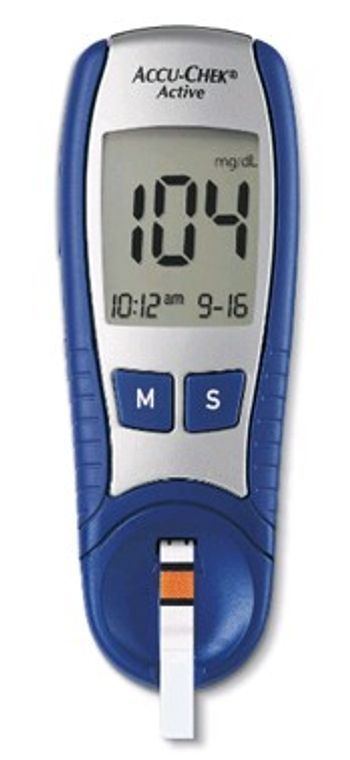
Roche ACCU-CHEK Active
 Roche · Model ACCU-CHEK Active
Quick, 5-second results - 10 seconds if dosed outside the meter. Choice of 6 test sites on the body2. Downloadable 200-value memory with 7- and 14-day averaging. Small 1.0 microliter sample size. Uses 1 readily available 3-volt lithium coin cell battery. 1,000-test battery life. Compatible with ACCU-CHEK data management tools. Preferred on most healthcare plan formularies, so you may save money. Flexible dosing in or out of the meter - apply blood to the test strip in the way that's easiest for you. Least-painful lancing device - won't tear your skin by wiggling from side to side.1 Plus, the Comfort Dial offers 11 depth settings to match your skin type. User-friendly handling - a large display, simple handling with just 2 buttons and an easy-to-hold design.
Typical Failure Modes
Compiled for this model from its own documentation and established engineering knowledge for this equipment class - not from a verified service record. Confirm against the manufacturer's service manual.
Inaccurate or questionable results
HighSymptoms: Result does not fit the clinical picture, poor duplicate agreement, control solution out of range.
Root cause: Damaged, expired or wrong-lot strips, wrong code chip / key, sample too small, or use outside the operating temperature range.
Meter error / strip problem message
MediumSymptoms: Error code (E-x) during or after a test.
Root cause: Faulty or mis-inserted strip, or a meter fault - repeat with a new strip.
Temperature out-of-range error
MediumSymptoms: Error stating the system is too hot or too cold.
Root cause: Meter and strips outside the specified operating range.
Will not power on / strip not detected
MediumSymptoms: No display on strip insertion, meter will not start a test.
Root cause: Depleted battery or worn / contaminated strip-port contacts.
Serviceable Parts & Consumables
Serviceable items for this model, compiled from its documentation and engineering knowledge for this equipment class. Service class and relative cost are estimates, not manufacturer figures; no part numbers are given. Confirm intervals and pricing against the manufacturer.
Battery
Class Frequent wear itemRel. cost $R&R Easy
Test strips and code chip / key
Class Frequent wear itemRel. cost $R&R Easy
Control solution
Class Frequent wear itemRel. cost $R&R Easy
Strip-port contact assembly
Class Periodic replacementRel. cost $$R&R Moderate
Lancing device
Class Periodic replacementRel. cost $R&R Easy
| Part | Service class | Relative cost | R&R difficulty |
|---|---|---|---|
| Battery | Frequent wear item | $ | Easy |
| Test strips and code chip / key | Frequent wear item | $ | Easy |
| Control solution | Frequent wear item | $ | Easy |
| Strip-port contact assembly | Periodic replacement | $$ | Moderate |
| Lancing device | Periodic replacement | $ | Easy |
Relative cost: $ lowest · $$$$ highest service-part cost for this equipment class. Not a price.
Troubleshooting Approach
A starting sequence for this model, compiled from its documentation and engineering knowledge for this equipment class. Follow the manufacturer's service documentation for the actual procedure.
Symptom: Result looks wrong
- Repeat with a new strip and an adequate sample.
- Run the control solution and compare to the range on the vial / insert.
- Confirm the code chip / key matches the strip lot.
- Check the ambient temperature is within range.
- If controls fail, quarantine the strip lot; if controls pass but results still look wrong, refer the meter.
Symptom: Error message
- Turn the meter off and repeat with a new strip.
- Move the meter and strips within the operating temperature range.
- Inspect the strip port.
- Replace the battery.
- Contact Roche customer service if it recurs.
Technical Specs
- Height
- 4.6 in
- Length
- 0.9 in
- Weight
- 57 g
- Width
- 1.7 in
Documents & Manuals
No documents available for this device yet.
Safety & Recalls
Synced live from the FDA openFDA API.
- RECALL
The reason for recall is the meters may show an incorrect measurement unit (mmol/L rather than mg/dL) and may result in the wrong unit of measure. Which may subsequently cause an error in interpreting a result as approximately 18 times lower that the actual blood glucose. Potential immediate health consequences of the glucose meter providing a reading in the wrong units of measurement (UOM) may result in inappropriate rescue therapy for presumed hypoglycemia including urgent and repeat administration of carbohydrates. This in turn could lead to frequent episodes of hyperglycemia which is unrecognized and undertreated.Long range consequences of continued use of the affected meters could include mismanagement of the patient s diabetes for longer periods of time potentially resulting in a major health event (in general persistent and/or severe hyperglycemia) that may lead them to seek med
- RECALL
Potential power issues with the Accu-Chek Guide Blood Glucose Monitoring System.
- RECALL
Users with Android OS 8.0 and above may be unable to transfer values obtained on their meter to the App.
- RECALL
Certain iOS and Android App versions contain a program error (bug) in the Bolus Advisor feature. After pairing a meter with the app for the first time, a customer may encounter the rare condition in which the countdown timer is not displayed and correction bolus advice is not available for the most recent, valid glucose reading. This same blood glucose value may become available for bolus advice calculation at a later time (countdown timer is displayed).
- RECALL
Certain iOS and Android App versions contain a program error (bug) in the Bolus Advisor feature. Due to a software bug, when the OS region of the phone setting is changed, the unit of measure within the app may unexpectedly change. This creates a risk the app might not transfer the blood glucose result or the user might not correctly input numerical values for carbohydrate used for bolus advice.
- RECALL
A program error (bug) in the Bolus Advisor feature, which could result in incorrect bolus advice and a potential insulin over-delivery.
- RECALL
iOS and Android: Under certain conditions the affected app versions may disregard historical bolus data potentially leading to an incorrect bolus insulin recommendation being provided to the user. iOS only: Pairing and using multiple meters with the Accu-Chek Connect app can under rare circumstances cause the bolus advisor to fail to offer a correction bolus recommendation within the eligible time window following a blood glucose measurement (10 15 minutes). Depending on the individual metabolic situation potentially incorrect bolus advice could lead to serious health consequences such as hypoglycemia. Both software issues may also cause the amount of active insulin displayed during the bolus calculation process to be incorrect and should not be used to manually calculate a bolus.
- RECALL
The LightCycler 480 algorithm used for the LightMix Zika rRT-PCR Test, EUA (catalog number 07987897001) occasionally (~1% of the time) calls a positive result for a negative sample if there is an inflection point in the fluorescence signal.
- RECALL
Roche Diabetes Care, Inc. initiated a voluntary recall for the version 1.2.0 of Accu-Chek Connect Diabetes Management App (iOS), released on July 11, 2016, due to the software containing a programming error (bug) in the Bolus Advisor feature, which could lead to an incorrect insulin bolus recommendation.
- RECALL
Accu-Chek Inform II Base Unit might produce physical transmission errors in the form of data loss in the communication between the meter and the Data Management Systems (DMS). The issue can lead to the data loss or in the worst case to an erroneous assignment of the patient data (patient mismatch). The issue will only occur at sites using POTCT1-A communication via USB.
- RECALL
Roche has become aware of an increase of mechanical errors experienced by customers using the Accu-Chek Spirit Combo insulin infusion pump and Accu-Chek Spirit insulin infusion pump when the insulin pumps display E6 and El0 error messages. If the user does not act upon the E6 and E10 error messages appropriately, insulin delivery will be stopped and if unnoticed may lead to severe hyperglycemia u
- RECALL
Roche Diabetes Care was informed by UnoMedical, the Manufacturer of ACCU-CHEK Tender I and ACCU-CHEK Tender II infusion sets, about potential for the the tubing of the infusion set to become detached at the connect/disconnect location on the ACCU-CHEK Tender I and ACCU-CHEK Tender II infusion sets. If tubing detachment occurs, insulin delivery is interrupted and the pump will not alarm to notify
- RECALL
Roche Diabetes Care has become aware of an issue with the Accu-Chek Connect diabetes management app that could potentially lead to inaccurate bolus advice being provided to the user. A thorough investigation of the situation revealed that this issue may occur if the user changes the screen orientation of the phone from portrait to landscape or vise versa while looking at the Bolus Advisor or Carb
- RECALL
The insulin pump may lose time and date settings during a power interruption (such as a battery change) due to a faulty capacitor. If the capacitor fails, the time and date will return to default setting. Though the pump prompts customers to confirm the time and date, if the user does not recognize the time and date have returned to default, a shift of their basal rate time block could occur.
- RECALL
Internal Roche inspections have revealed that after the lancet is used for a finger stick, the needle may not fully retract back within the lancet drum or back into the cap. This allows the needle to protrude inside the cap or outside of the cap of the ACCU-CHEK FastClix lancing device.
- RECALL
Roche investigation into complaints found Accu-Chek Inform II and CoaguChek XS Pro System barcode reading meters had the potential of intermittent erroneous decoding of patient identification if barcodes being read fail to meet size and/or quality standards.
- RECALL
Erroneous results: Internal investigations revealed that the test strips exhibited a performance issue that can cause test strip errors or a bias in test result that exceed the tolerance range according to EN ISO 15197.
- RECALL
There may be a significant negative bias when testing neonate samples.
- RECALL
The lancet cap may be missing, which could result in an unintended lancet stick to the user.
- RECALL
The drying agent beads, located in the cap, may become loose and fall into the vial causing the test strips to potentially give incorrect blood glucose test results.
- RECALL
There may be a thin piece of plastic across the mouth of the vial, preventing the cap from sitting snugly onto the vial and, if present, this situation will cause erroneously low or high blood glucose readings.
- RECALL
The meter may self-start without a sample having been applied and report erroneous results without an error message if an undosed test strip is bent upwards, and held upwards, while the meter is waiting for the sample.
- RECALL
The meter may self-start without a sample having been applied and report erroneous results without an error message if an undosed test strip is bent upwards while the meter is waiting for the sample or if the test strip opening has been previously flooded with excess control solution or blood.
- RECALL
A firmware bug may allow test results from other systems, recorded into the INFORM system via the OTE functionality, to be reversed from positive to negative, and vice versa.
- RECALL
Exposure to excessive disinfectant or cleaning solution may cause overheating, melting, or smoke.
- RECALL
Crack in the bottom of the test strip vial will cause erroneously low or high blood glucose readings.
Troubleshoot this device with Bio
Describe a symptom or error code. Bio answers from this device's own documented error codes, failure modes, parts, and guides.
Ask Bio