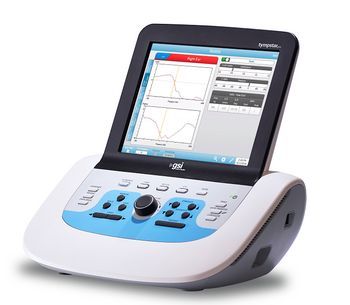
GSI Tympstar Pro
 GSI · Model Tympstar Pro
1. Tymp Touch Technology The 12 inch color display allows the examiner to change parameters with a single touch. 2. Programmable User Tests Predefined protocols to save time and create consistency in testing. 3. Zoom Function For detailed analysis, use the zoom to analyze test results. 4. Stand-Alone and PC Enabled EMR/EHR compatible with GSI Suite for reporting and counseling. Suite is a module within Noah for comprehensive reporting. 5. Test Type Buttons Fast transition between tests for accurate and efficient testing. 6. Multiple Probe Tone Frequencies Test a diverse patient population with 226, 678 and 1000 Hz that come standard to test infants up to 6 months of age.
Key tips
- ·Electrode impedance drives data quality more than almost any other single factor - check it before assuming an amplifier fault.
- ·Pre-case verification of intraoperative monitoring equipment isn't optional - a mid-case failure has direct surgical-decision consequences.
Typical Failure Modes
Compiled for this model from its own documentation and established engineering knowledge for this equipment class - not from a verified service record. Confirm against the manufacturer's service manual.
Output level / calibration drift
HighSymptoms: Fails the annual / biological calibration check, levels perceived too loud or soft, channel imbalance.
Root cause: Transducer (headphone / insert / bone) ageing or damage, or electronics drift - needs calibration to the standard.
Transducer / probe fault
MediumSymptoms: No or intermittent tone in one side, rattling, no probe seal (tymp / OAE), probe-check fails.
Root cause: Worn headphone / insert / bone transducer, or a blocked / damaged probe tip.
Pump / pressure fault (tympanometry)
MediumSymptoms: Cannot achieve or hold pressure, pump noisy, flat / no tympanogram.
Root cause: Air-pump wear or a leak in the probe / tubing.
Patient-response / talkback fault
LowSymptoms: Response button not registering, no talk-forward / talk-back audio.
Root cause: Response switch, the talkback mic, or the audio path.
PC / printer / database fault
LowSymptoms: Results will not save, print or transfer to NOAH / the EMR.
Root cause: PC, printer, or the interface.
Serviceable Parts & Consumables
Serviceable items for this model, compiled from its documentation and engineering knowledge for this equipment class. Service class and relative cost are estimates, not manufacturer figures; no part numbers are given. Confirm intervals and pricing against the manufacturer.
Headphone / insert / bone transducer set
Recalibrate the audiometer to the transducer after replacement.
Class Periodic replacementRel. cost $$$R&R Fairly easy
Tymp / OAE probe & tips
Class Frequent wear itemRel. cost $$R&R Fairly easy
Air pump (tympanometry)
Class Periodic replacementRel. cost $$R&R Moderate
Patient response switch
Class Periodic replacementRel. cost $R&R Easy
Annual calibration to standard
Class Frequent wear itemRel. cost $$R&R Easy
| Part | Service class | Relative cost | R&R difficulty |
|---|---|---|---|
| Headphone / insert / bone transducer set Recalibrate the audiometer to the transducer after replacement. | Periodic replacement | $$$ | Fairly easy |
| Tymp / OAE probe & tips | Frequent wear item | $$ | Fairly easy |
| Air pump (tympanometry) | Periodic replacement | $$ | Moderate |
| Patient response switch | Periodic replacement | $ | Easy |
| Annual calibration to standard | Frequent wear item | $$ | Easy |
Relative cost: $ lowest · $$$$ highest service-part cost for this equipment class. Not a price.
PM Checklist
Preventive-maintenance tasks typical of this equipment class. Perform to the manufacturer's procedure and your facility's policy - this is general reference, not a schedule for this specific unit.
- ·Electrode / lead impedance check
- ·Amplifier calibration
- ·Annual electrical safety test
Troubleshooting Approach
A starting sequence for this model, compiled from its documentation and engineering knowledge for this equipment class. Follow the manufacturer's service documentation for the actual procedure.
Symptom: Calibration or level concern
- Do a listening / biological check on a known-normal ear.
- Confirm the correct transducer is paired and its calibration is current.
- Compare left / right and air / bone balance.
- Send the unit for calibration to the audiometric standard if it fails the check.
- Keep the calibration certificate with the device.
Symptom: No tone or no probe seal
- Swap the transducer / probe and cable.
- Clear or replace the probe tip and check the tubing for blockage.
- For tympanometry, leak-test the probe and pump.
- Run the probe-check / self-test.
- Replace the transducer, probe or pump as isolated.
Typical Location
Where this class of equipment is typically deployed - general reference, not this unit's own placement record.
- Neurology / EEG lab
- ICU (continuous EEG monitoring)
- Operating Room (intraoperative monitoring)
Documents & Manuals
No documents available for this device yet.
Troubleshoot this device with Bio
Describe a symptom or error code. Bio answers from this device's own documented error codes, failure modes, parts, and guides.
Ask Bio